Tuesday, January 31, 2017

Schimb valutar (conversie) cryptomoneda ethereum in lei (ETH-RON)

Photo: Shutterstock


Acest scurt tutorial este pentru cei care vor sa inceapa sa mineze Ethereum si nu stiu cum sa transforme ulterior cryptomoneda ETH in RON. Desigur, exista mai multe variante. Pt pasii de mai jos, se presupune ca ai deja un sistem ("rig") care mineaza Ethereum. Recomand ca distributie EthosDistro (costa 40$). Acest tutorial este valabil pentru single-rig mode, adica un singur sistem in retea care mineaza.

1) Configurezi "rigul" sa genereze ETH intr-un pool (ex. Dwarfpool). Daca folosesti EthOS, atunci trebuie sa treci in fisierul de configurare /home/ethos/local.conf serverele Dwarfpool, astfel
proxypool1 eth-eu.dwarfpool.com:8008
proxypool2 eth-eu.dwarfpool.com:8008

2) Creezi cont Poloniex, ce iti va genera cateva portofele pentru monede digitale, printre care si portofel ETH. Pe tine doar portofelul ETH te intereseaza. (Nota: recomand activarea 2FA, altfel risti sa iti blocheze operatia de Withdraw din motive de siguranta)

3) Configurezi "rigul" sa trimita automat monedele digitale din Dwarfpool catre Poloniex. Daca folosesti EthOS, atunci schimbi corespunzator in local.conf (treci adresa ta de portofel ETH de la Poloniex):
proxywallet 0x98bdd737cd4919b6661f71d96e2153244eb45e44

4) Creezi cont Coinflux si prepari un Flux ETH-to-RON. Daca nu te descurci, cei de la suport sunt foarte prompti via Live-chat (program Luni-Duminica: 08:30-23:59)

5) In Poloniex faci Withdraw la suma de ETHER pe care vrei sa o schimbi, catre Coinflux wallet. Adresa catre care faci withdraw o gasesti in Coinflux: selectezi fluxul ETH-to-RON si apesi butonul SELL ETHER; in campul "Sell address" gasesti adresa catre care faci withdraw (este practic portofelul Coinflux). Aceasta operatie poate dura intre 15'-30' sau putin mai mult.

Odata facuta operatia de mai sus, schimbul valutar ETH-RON se face automat si banii RON vor intra in contul tau bancar in mai putin de 24h (in zilele lucratoare).

Update 2017-02-06:
Coinflux anunta ca: "(...) incepand de marti, 7 februarie 2017, CoinFlux va avea doi noi parteneri bancari: BRD - Groupe Societe Genenerale si Veneto Banca Romania. Totodata, CoinFlux incheie colaborarea cu UniCredit Bank."

___
About / Despre acest blog
Disclaimer and privacy statement / Confidenţialitate
Updated / Actualizat: 2017-02-02

Monday, May 9, 2016

Video files demos for testing playability


In order to test players video compatibility, I collected a list of links with sample video files for testing purposes. Videos can be played and/or downloaded from within browser.

MPlayer sample files
http://samples.mplayerhq.hu/

VLC Plugins Demo Page
http://people.videolan.org/~dionoea/vlc-plugin-demo/

Example FLV Files
http://www.mediacollege.com/adobe/flash/video/tutorial/example-flv.html

Open source movies created using 3D software Blender
https://www.blender.org/features/projects/

List of open-source films
https://en.wikipedia.org/wiki/List_of_open-source_films

Videos of different resolution and sizes to test while designing or developing a mobile app
http://www.sample-videos.com/

Sample WebM, Ogg, and MP4 Video Files for HTML5
http://techslides.com/sample-webm-ogg-and-mp4-video-files-for-html5

WebM demo files
http://www.webmfiles.org/demo-files/

DivX
http://www.divx.com/en/devices/profiles/video

Sample HEVC Video Files (x264, x265)
https://x265.com/hevc-video-files/

Jellyfish Video Bitrate Test Files
http://jell.yfish.us/

Sample video files to test media players
https://tuxdiary.com/2012/06/29/sample-video-files-for-media-player-tests/

Samples Kodi
http://kodi.wiki/view/Samples

HubbleSOURCE: MPEG Video Clips (videos from space)
http://hubblesource.stsci.edu/sources/video/clips/

DTS THX Dolby WMV Movie Distributor VOB Trailers
http://www.demo-world.eu/movie-trailers-hd/

ShedWorx sample videos
https://shedworx.com/shedworx-samples

Ogg multiplexed audio/video file
https://commons.wikimedia.org/wiki/File:Xacti-AC8EX-Sample_video-001.ogg

Microsoft HD Showcase - wmv, wma and wma pro
http://www.microsoft.com/silverlight/iis-smooth-streaming/demo/
http://www.microsoft.com/windows/windowsmedia/musicandvideo/hdvideo/contentshowcase.aspx

Friday, May 6, 2016

HDTV cable for Samsung Galaxy devices (MHL cable, MHL adapter)


If you're dealing with a problem regarding which MHL adapter should a Samsung Galaxy device need, I found a few interesting links explaining everything regarding MHL and the compatibility list of Samsung devices.

MHL allows for MIRRORING of the screen. It can't be used  as an extension or 2nd display. There is no performance difference from the phone to the connected display.


A nice introduction here:
http://www.howtogeek.com/201822/how-to-connect-your-android-phone-to-your-tv/
(November 12, 2014 by Jason Fitzpatrick)

This is a nice video where you'll find info about MHL Adapters, HDMI Screen Mirroring, Passive vs. Active cables and MHL technology, Samsung's 11-pin, phone/tablet connecting to TV via DVI adapter:
https://www.youtube.com/watch?v=GrBkQ4GUXf0
by Jeremy Phan

This is where you'll find which MHL adapter to use with any Samsung Galaxy device:
http://blog.clove.co.uk/2014/02/05/mhl-adapter-samsung-galaxy-need/
(February 5, 2014 By Josh Bethell)


Remember, you will always find which phone or tablet has MHL support in their specs page (either official or GSMarena which has inline search support). Currently, MHL-capable phones and tablets include devices from HTC, Samsung, LG and others.

For Samsung devices, MHL is typically connected via a device's 5-pin micro-USB port. However, Samsung uses a proprietary 11-pin interface so if you're purchasing an MHL adapter/cable, you'll need to purchase the (11-pin to 5-pin adapter):
http://www.amazon.com/Monoprice-11-Pin-Adapter-Samsung-Galaxy/dp/B00DIGBEXU/

How do I connect my Samsung Galaxy S4 to my TV using the MHL 2.0 HDMI adapter?
http://www.samsung.com/uk/support/skp/faq/1032404


___
About / Despre acest blog
Disclaimer and privacy statement / Confidenţialitate
Updated / Actualizat: 2016-05-07

Sunday, May 1, 2016

Remote support

Daca ai nevoie sa te ajut de la distanta, ma poti suna si apoi faci click pe imaginea de mai jos:


Restul detaliilor le discutamla telefon.

Saturday, January 24, 2015

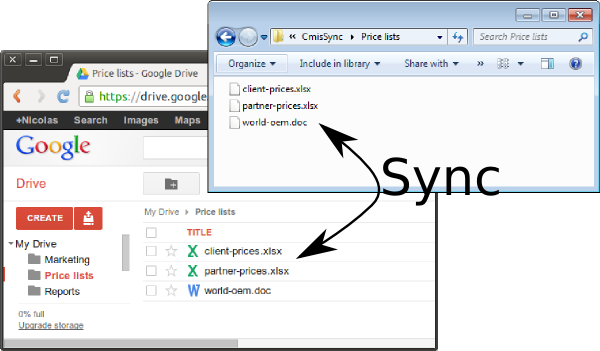
Google Drive Sync ugly client (Windows)


Google Drive is a place where you can create, share, collaborate, and keep all of your stuff. Whether you’re working with a friend on a joint research project, planning a wedding with your fiancé or tracking a budget with roommates, you can do it in Drive. You can upload and access all of your files, including videos, photos, Google Docs, PDFs and beyond.
Credit: FileHippo
The latest version of Google Drive Sync (v1.19 as of this writing) looks incredible ugly for my taste. Look at this:
- last files sync (I don't need that info)
- to exit client I have to click 2 times (I don't keep the client running all the time)
- it's HUGE ! (good for desktop and big monitor, but BAD for laptop!)


If you're like me and prefer a previous version, you may find v1.16 on FreewareUpdate. This is how it looks:


Note: An alternative client for sync Google Drive is insync. Why use insync? See bellow:


Tell me what you think in comments bellow! I'd love to know your thoughts.

Tuesday, June 24, 2014

Create a Windows 7 System Repair Disk ISO under Virtualbox

1. Install Oracle Virtualbox, having host: Windows | linux | Mac OS X
2. Install Windows 7 OS in your virtual machine (32-bit or 64-bit, as needed).
3. Install IMGburn as a burning utility.
4. Install TotalMounter and Follow pfurrie's detailed suggestions: open the program >> use "Mount" menu >> choose "Virtual CD/DVD-RW".
5. Open "Backup and Restore" and create a System Repair Disc ISO.

After all is done, use your 32-bit/64-bit ISO to do what need or burn it to a CD and use it to repair Windows 7 install . :)


Tips:
32-bit System Repair Disc can only be created on a 32-bit Windows 7.
64-bit System Repair Disc can only be created on a 64-bit Windows 7.

32-bit System Repair Disc can only be used to repair a 32-bit Windows 7.
64-bit System Repair Disc can only be used to repair a 64-bit Windows 7.

uTorrent - Move torrents from one PC to another (or from one profile to a new profile)


1. Stop all torrents in the torrent list in µTorrent.

2. Exit µTorrent

3. Move the torrent folder
c:\Users\%USERNAME%\AppData\Roaming\uTorrent\
... to the new location (in your new PC or profile), similar path

4. Move the start shortcut
c:\Users\%USERNAME%\AppData\Roaming\uTorrent\
... to the new location (in your new PC or profile), similar path

5. Done


Inspired by, and adapted from, this post:
http://help.utorrent.com/customer/portal/articles/1826054

Note: You may want to know how to disable Ads in uTorrent.

Monday, June 23, 2014

Disable Ads in uTorrent

Quick note about µTorrent, if you use it and hate ads. It works for me in version 3.4.1.

To turn off ads and offers, open Options > Preferences > Advanced. Here you'll find a large list of flags for the app and a filter box. Search for and disable the following flags:
  • offers.left_rail_offer_enabled / left_rail_offer 
  • gui.show_plus_upsell
  • offers.sponsored_torrent_offer_enabled / sponsored_torrent_offer_enabled
  • bt.enable_pulse
  • gui.show_notorrents_node
  • offers.content_offer_autoexec

Note1: These flags may be named slightly differently depending on which version of the app you're using. Be careful when editing things if you're not entirely sure what they do.

Note2: If the top bar ad still doesn't go away, just restart the application.

Note3: You may prefer to use an older version and no ads out-of-the-box. Version 2.0.4 and 2.2.1 are safe to try. These can be found either on oldversion.com or filehippo.com.

Note4: Add search providers
http://www.ghacks.net/2012/07/28/how-to-add-search-providers-to-utorrents-torrent-search/
PirateBay|https://thepiratebay.se/search/
KickAssTorrents|https://kat.cr/usearch/
Mininova|http://www.mininova.org/?cat=0&search=
Torrentz.eu|https://www.torrentz.eu/search?q=
isoHunt|https://isohunt.to/torrents/?ihq=
TorrentReactor|https://torrentreactor.com/torrents-search/windows+aio
Torrent-finder|http://torrent-finder.info/show.php?q=
SceneFZ|https://scenefz.net/browse.php?param_val=0&complex_search=0&incldead=a0&orderby=added&sort=desc&param=--&param_op=1&search=


Credit:
http://lifehacker.com/disable-ads-in-utorrent-via-settings-826283231

uTorrent v2.x/3.x - Best Practice Tips
https://forum.utorrent.com/topic/60691-utorrent-v2x3x-best-practice-tips/


Note: you may want to know how to quickly move torrents from one PC/profile to another.

Sunday, May 11, 2014

Eurovision 2014 - curios, socant, interesant


Inspirat de postarea lui Cabral m-am decis sa scriu cateva cuvinte despre Eurovision 2014. Nu postul in sine si opiniile exprimate de Cabral sunt la baza motivului (fiecare cu parerea lui, normal), ci doar faptul ca am vazut postarea lui despre Eurovision 2014 chiar pe Google Plus la mine.


Curios de fel, si un pic socat de castigator (sau, ma rog, castigatoare - cum se considera Conchita Wurst), am dat de un interviu care, recunosc, m-a captivat un pic: am incercat sa inteleg. Am considerat tot timpul pana acum tot curentul asta gay si trans ceva anormal. E sau nu e... poate ca putin conteaza. Mi-a atras atentia urmatoarele cuvinte din interviu:

"Q: What would be your great achievment from Eurovition that you would want to personally get from the contest?

A: (...) from my inner believes it would be just great if people stop to think different than is used to, because there is so much going on throughout Europe these days - it's just awful all the news which are getting in day by day, and I think that it has to be a change... (...) everybody is allowed to do whatever they want it to do (in case nobody gets hurt), so... this would be the situation I want to create that people stop to talk and start to think, they don't have to love it, they just have to accept it - and that's all it's all about.


Remarci:
1. Concita este o persoana care gandeste, vorbeste articulat si coerent. Respect.

2. Este absolut decent sa ceri oamenilor din jurul tau sa gandeasca in loc sa vorbeasca din impuls, asa cum au fost invatati de o societate invechita. Societatea s-a schimbat, a evoluat, intr-un sens in care nici eu, nici tu (probabil) nu stii in mod absolut ca "e bine asa".

Suntem doar privitori neputinciosi a lucrurilor din jurul nostru care se schimba, unele in bine, altele in rau. Suntem fiinte adaptabile intr-un mod extrordinar. Vom supravietui.


Despre Austria la Eurovision 2014: e draguta piesa. Se pare ca e suficient sa stai acolo pe scena, si sa canti, ca sa castigi competitia.


Despre Romania la Eurovision 2014: mi-a placut - foarte energica, foarte frumoasa. Bravo Romania. As zice un nemeritat loc 12 (na, sunt subiectiv!).


Despre Eurovision: in sfarsit am inteles ce inseamna aceasta competitie, in care rezultatul este de ani buni extrem de controversat. Eurovision este ocazia ideala de a prezenta situatii socante, diferite, creative intr-un anume sens iesit din formal. Este poate acel concurs care reuseste, an de an, sa supravietuiasca prin aparitii socante. Este acel spectacol care prezinta tuturor pasionatilor de muzica sau spectacol (includem aici copii si batrani), situatii noi. Invatam sa acceptam.


Recap Eurovision


Daca aveti ceva de spus, mi-ar placea sa cunosc opiniile voastre in comentarii.

[2014-11-05]


Tuesday, October 1, 2013

Reorganizare

Alest blog duce lipsa acuta de organizare. Lucrez la asta si sper ca in curand va fi un loc placut la citit pentru toata lumea...

This blog has an urgent need for reorganization. I'm working on it and hope it will be soon a pleasant site to read...


Social


Blog: iulmit.blogspot.com
Linkedin: linkedin.com/in/iulmit
Twitter: twitter.com/iulmit
Facebook: facebook.com/iulmit | facebook.com/yearinreview/iulmit
Google+: google.com/+IulianMitrica
Klout: klout.com/user/iulmit
Pinterest: pinterest.com/iulmit
AboutMe: about.me/iulmit

Other:
InfoTrends: paper.li/f-1364503376 (daily e-paper)

Wednesday, September 25, 2013

How to view complete message source (email source, email header) in Outlook 2010

Shortly, not easy way. Especially when using Outlook 2010 (probably, 2007 and 2013 as well). And especially when you must configure your account as Microsoft Exchange. Why is Microsoft invent tools that nobody use them? Their Outlook 2013 became such a bloatware that I could hardly find what I need. Most of the time I just want a simple email client, nothing more.

So, this is what I am talking about (as explained in this question):
http://superuser.com/questions/476940/outlook-2013-view-source-of-an-email

As the answers tell (verified by myself as well), it does not simply work on an Outlook 2010. Here is what you can do about it:

Solution 1
Install Mozilla Thunderbird and configure your account as IMAP (or POP3). It will work >> select a message or open it in new tab/window, then press Ctrl+U to see the source. You will see the header + source. Great staff!

Solution 2
Install eM-client, then configure your account as IMAP (or POP3). It will work >> right-click on the message and you have 2 options: View Mail Header and View Mail Source. As simple as that. :)


Update: I finally found out where it's hidden this options (dooh!... Microsoft):
Open Message > Message Tab > Tags > Arrow at bottom right

And here is how you make a shortcut to it:

  1. In the main window (Outlook), go to File -> Options
  2. Select the Quick Access Toolbar on the left.
  3. Set the "Choose commands from" dropdown list to; Commands Not in the Ribbon
  4. From the command list select; Message Options…
  5. Press the "Add >>" button.
  6. Press OK.

The option is now added to the Quick Access Toolbar at the top of your Outlook window and view the Internet headers of a message without needing to open it first.

Saturday, September 14, 2013

Linkedin User Agreement updated on Sep. 12, 2013

Linkedin User Agreement has been updated on September 12, 2013.


Summary of Changes to LinkedIn User Agreement

This summary is intended to facilitate your review and understanding of the changes to the User Agreement. However, please take the time to read the full document, as you will be bound by its terms when you view, access or otherwise use LinkedIn’s online services.
Some highlights of the revisions to the User Agreement follow:
We have changed the minimum age of a person to access LinkedIn’s online services. LinkedIn is not available to children under 13, but the minimum age to become a member of LinkedIn will be anywhere from 13 to 18 years old depending on the country, as described in Section 2.3.
We have provided notice that LinkedIn will continue to charge your chosen payment method until you cancel the Premium Service or your membership, as described in Section 2.6.

If you'd like to read everything, here are the links: User Agreement and Privacy Policy.

Thursday, February 28, 2013

OpenConnect

Evenimentul OpenConnect se tine Joia la Starbacks Mall Vitan, incepand cu 9:30am. 

Nu costa nimic. Daca aveti putin timp puteti arunca o privire pe site-ul oficial (http://openconnect.ro/). Ca sa va faceti o idee despre dinamica lucrurilor aruncati o privire pe facebook (https://www.facebook.com/groups/355893314491424/). Tineti cont ca suntem la editia nr 23, adica eveniment pornit cu circa 5 luni in urma. De la (aproape) nimic, adica doar intalniri cu cateva persoane, s-a ajuns la:
- 20 cafele gratis pentru participanti
- 50-60 participanti la fiecare editie, intr-un loc cu tot atatea scaune (numarul participantilor e in crestere)
- transmisie partiala live pe internet (de la 50-100 vizionari live, acum sunt peste 3000) - si mult mai multe dupa eveniment....
- interactivitate si imbunatatiri permanente
- o atmosfera speciala si un mediu foarte sanatos: amuzant, interesant, in trend, cu idei, concepte, interactivitate cu persoane necunoscute din diverse domenii

Felicitari Dragos Roua!

Pentru mine este a 4a editie la care paticip si incep sa devin dependent... Tot aici la OpenConnect, astazi 28-feb-2013, lansez  public acest blog care se doreste a fi o noua oaza de informatie de calitate, cu opinii proprii despre diverse subiecte care ma pasioneaza (dezvoltare personala, informatii financiare, oportunitati pentru incepatori sau pur si simplu intamplari din viata mea), dar si informatii tehnice din domeniul meu de activitate (IT hardware & software, tutoriale, informatii tehnice).

Daca va place, tineti aproape!


Edit 2014: http://webblog.bestwebimage.ro/2014/01/ce-este-open-connect/

Monday, February 18, 2013

Remote access to linux via SSH using Putty (and draw lines correctly)

Update 2014: Actually, it's pretty simple to solve all these things, when using Ubuntu 12.04 (US English) and Putty 0.63. I didn't check other distros. Configure Putty like this:
- Terminal >> Keyboard >> The Function keys and keypad = Linux
- Window >> Translation >> Remote Character set = UTF-8
All works great!


When logged in from a Putty terminal, some programs render correctly the bars made of characters using in putty UTF-8, while others render them correctly using ISO-8859-1:1998 (Latin-1, West Europe) in Putty settings. I haven't found a nice way to deal with this problem, and I'm gonna keep a log of programs' preferred way.

UTF-8: hddtemp, links, links2, lm-sensors, mc, moc, smartmontools,
ISO-8859: alsamixer, elinks, iptraf, mp3blaster, sysv-rc-conf, wavemon

Keep in mind that this is related to the way server's locale is configured. My server locale shows the following output:
server:~# locale
LANG=en_US.UTF-8
LC_CTYPE="en_US.UTF-8"
LC_NUMERIC="en_US.UTF-8"
LC_TIME="en_US.UTF-8"
LC_COLLATE="en_US.UTF-8"
LC_MONETARY="en_US.UTF-8"
LC_MESSAGES="en_US.UTF-8"
LC_PAPER="en_US.UTF-8"
LC_NAME="en_US.UTF-8"
LC_ADDRESS="en_US.UTF-8"
LC_TELEPHONE="en_US.UTF-8"
LC_MEASUREMENT="en_US.UTF-8"
LC_IDENTIFICATION="en_US.UTF-8"
LC_ALL=


What to do: configure ssh client in other systems (Putty) to use UTF-8 and match server's locale to get nice display of man pages and character bars of some programs. The optimum settings I have found so far are the following:
- Window >> Translation >> Remote Character Set >> UTF-8
- Connection >> Data >> Terminal-type string >> linux


Other Putty settings I choose to alterate from default:
- Lines of scrollback = 900
- Window title (i.e. "[root@server1.example.com]", without quotes)
- Auto-login username (i.e. "root", without quotes)
- Enable compression
- Permit only protocol version 2


https://bbs.archlinux.org/viewtopic.php?pid=511920
http://www.andremiller.net/content/getting-midnight-commander-line-drawing-work-putty
http://rc.quest.com/topics/putty/doc.php#config-linedraw
http://blog.sanctum.geek.nz/putty-configuration/
http://sourceforge.net/p/nmon/bugs/4/
http://superuser.com/questions/393834/how-to-configure-putty-to-display-these-characters
http://www.thegeekstuff.com/2009/07/10-practical-putty-tips-and-tricks-you-probably-didnt-know/


Last update: 2013.03.18

Sunday, February 17, 2013

SSH login with Putty, without password

Install ssh-server if it's not already installed. In Debian/Ubuntu, this is what we have to do:
# apt-get install ssh openssh-server

I am using authentication between two hosts without the need of a password in 4 easy steps:
    1. Generate the keys using a DSA authentication identity:
    # ssh-keygen -t dsa
    2. Make a new "authorized_keys" file (if not already there) an paste the key generated by puttygen (see login via Putty without a password):
    # vim ~/.ssh/authorized_keys
    3. Assign rw permissions only for the owner
    # chmod 600 ~/.ssh/authorized_keys
    4. Configure Putty to know where the saved private key file (see login via Putty without a password)

If you'd like to secure SSH, more setup is neccessary. Hints: fail2ban (blacklist IPs using iptables), denyhosts (blacklist IPs using /etc/hosts.deny file).

When in trouble configuring Putty to access remote machines, you may find useful this post:
http://iulmit.blogspot.ro/2013/03/remote-access-to-linux-via-ssh-using.html


Reference:
Debian Linux Install OpenSSH SSHD Server
SSH Debian Wiki


Last update: 2013.03.17

Thursday, December 20, 2012

Windows 8 tablets

This article is not finished, you may follow me to get updates.

If I would have to choose now one tablet out of 9 from Microsoft Store (thus, having Windows 8 installed), that would be one of the following three:

Note: be aware that Asus VivoTab RT TF600T has Windows RT installed and not Windows 8. As explained on Wikipedia, Windows RT is a modified version of Windows to run on ARM platform. Thus, many applications designed for Windows will not run on this version!

Friday, December 14, 2012

How to install some free tools to resize partitions

There are free tools which can be used to resize partitions:


I'll show you how to install the one you like.


EASEUS Partition Master Home Edition - version 9.1.1 as of this writing

We download from one of the links above or can click <here> to download it directly. After saving in a place where you like (Desktop is fine), double click on it to start installation. You may get a warning from the operating system if you are sure this software is from a trusted source. It is, so confirm using Run button:

The installer will guide us to install this program. Press Next:


We have to (read and) accept EULA, then press OK:

A small ad for the Professional (and paid) Version. Nothing to do (click Next):

If we want to change the installation path...We can leave it default, or change the path like I did in the picture, then press Next:

Waiting for the install program to finish. Nothing to do except chilling:


Well, finally. The program is installed and we are noticed about that. We can tell the installer to place shortcuts if we need. We don't want additional screens, pop ups or anything else, so we disable update check. Then press Next:


We are asked if we want receive emails, we don't and we leave that form blank. Finally, we press Next and expect the program to start:

Our expectation will not confirm, because this nag screen let us choose to, finally, start the program (dooh!):

Great, we can now manage our partitions! Be aware to KNOW what you're doing. If you don't, find somebody who DOES, or else you may delete valuable information.

After finish working with this program, we usually close it from X (at he top-right). Even if we do, we may notice that a small icon is still in the systray. We can right-click on it and press Exit to close it. Or choose Open to show the window from the back:


EASEUS Partition Master Home Edition - version 9.1.1 as of this writing


We download it from one of the links above (at the top of this page). After saving in a place where you like (Desktop is fine), double click on it to start installation. You may get a warning from the operating system if you are sure this software is from a trusted source. It is, so confirm using Run button:


The installer will guide us to install this program. Press Next:

We have to (read and) accept EULA, then press Next:

If we want to change the installation path...We can leave it default, or change the path like I did in the picture, then press Next:

We are asked if we want to modify how this program will appear in the list of programs. We can leave it default, or change how I did. Press Next:

We want shortcut on desktop to find it easily. Press Next:

This window only confirms what preferences we want, before installing. If it's not what we want and we skipped something, we can go back. We didn't, so we press Install:

Waiting for the installer to finish. Nothing to do, just chilling:

Everything is done and good if we see this. Press Finish and the program will start:

Great, we can now manage our partitions! Be aware to KNOW what you're doing. If you don't, find somebody who DOES, or else you may delete valuable information.


Published: 2012.12.14


Wednesday, December 5, 2012

How to install Gimp

Gimp is a well respectable graphics editing tool, free to use for everyone. It's similar to Adobe Photoshop, de facto professional editing software.

Here is a small tutorial for those who are not skilled at installing software (I may say it's rather the fear to break things). This is simple, check it out!

We download Gimp from the original website http://www.gimp.org/downloads/, as of this time version 2.8.2, You can click <here> to download it directly. After saving in a place where you like (Desktop is fine), double click on it to start installation. You may get a warning from the operating system if you are sure this software is from a trusted source. It is, so confirm using Run button:


We can choose between Deutsch, English, Italian and Slovenian. I choose to let default English:
 

We want to customize this installation, so we press the button Customize:

We have (to read and) accept EULA. Press button Next:

If we want to change the installation path... I leave it as default, press Next:

Default options are good (if we also want other languages).

I chose English language and I don't need translations, so I disabled Translation option. Press Next after that:

I don't want to let Gimp open files by default, other than it's type. I leave it as default:

We want shortcuts to find it easily:

This window only confirms what preferences we want, before installing. If it's not what we want and we skipped something, we can go back. We didn't, so we press Install:

Waiting.. installing... The Setup program do what we chose and prepare Gimp to be used on our computer.

Everything is done and good if we see this:


Now we are ready to use Gimp to impress friends, learn or use it like a professional that we are. Great stuff!


Published: 2012.12.05

Bad news about Yahoo Messenger

Yahoo messenger is changing starting December 14, 2012. This time, some functions won't be available anymore:
- public chatrooms close down
- Pingbox (on your blog or social networks) no more available
- Live Messenger contacts won't be reachable, but they will still appear (greyed out) in your list of contacts
- no more voice phone (via Jajah), but free messenger-to-messenger will still be available

More info on Yahoo blog.

Published: 2012.12.05

Monday, December 3, 2012

Nokia E51 whistles and bells

Did I tell you how much I like this phone?

Some background
I like a cellular first to be a cell phone: good and loud sound, good coverage, many contacts, long battery, strong built. A must have is the clock and the alarm, but that should be included in the packet (I never saw a cell phone without).

Then, it might need to have basic agenda functionality: calendar, notes. That is something I like more and more, I use to keep notes and reminders everyday now.

Radio, Flash Disk support and Bluetooth would be a plus, 'though I might live without them. Now that almost all phones has these, I don't mind. I get used with them more and more.

I wish it would have wireless connection and the ability to install applications. That would open a whole new world to it: internet calls, email checking and other internet staff - all at a fraction of the cost, because wireless is everywhere around us.


Ladies and gentlemen, here is the winner: Nokia E51. Because it's mine and it fits my needs!

As a bonus, I installed some software which extends its basic functionality:
- Abolute 80s
- Battery Extender
- Calcium (calculator)
- Curs Valutar BNR (Romanian, exchange)
- Energy Profiler
- Energy Radio
- Facebook
- Facebook Chat
- FoneFinder
- fring
- GetJar Apps (Apps repository)
- Google apps (Google, Gmail, Calendar, Maps, Youtube, Google+)
- HandyWiFi
- Hotnews.ro (Romanian News)
- Internet Radio
- Live Messenger
- Midomi (music recognition software, awesome!!)
- Nimbuzz
- Nokia Messaging (Email Setup)
- Opera Mini (version 5)
- Opera Mobile (version 10)
- OVI Store (Apps repository)
- ScanLife
- SIP Voice Settings
- Slick
- Skype
- Stopwatch
- Sudoku (game)
- Talkonaut
- Talktimer
- Twitter
- Wikipedia Mobile
- Y Messenger
- Y! Mail (Yahoo Mail)

More apps could be installed via OVI Store and GetJar Apps.


Sometimes I get into trouble with it. Solutions bellow:
Nokia E51 won't disconnect after WLAN scanninghttp://iulica.blogspot.ro/2010/09/nokia-e51-wont-disconnect-after-wlan.html


At a decent price, I guess I did a good job! Thanks Nokia for building, from time to time, some good products!


Published: 2010.09.01
Last update: 2012.12.03